Hi everyone,
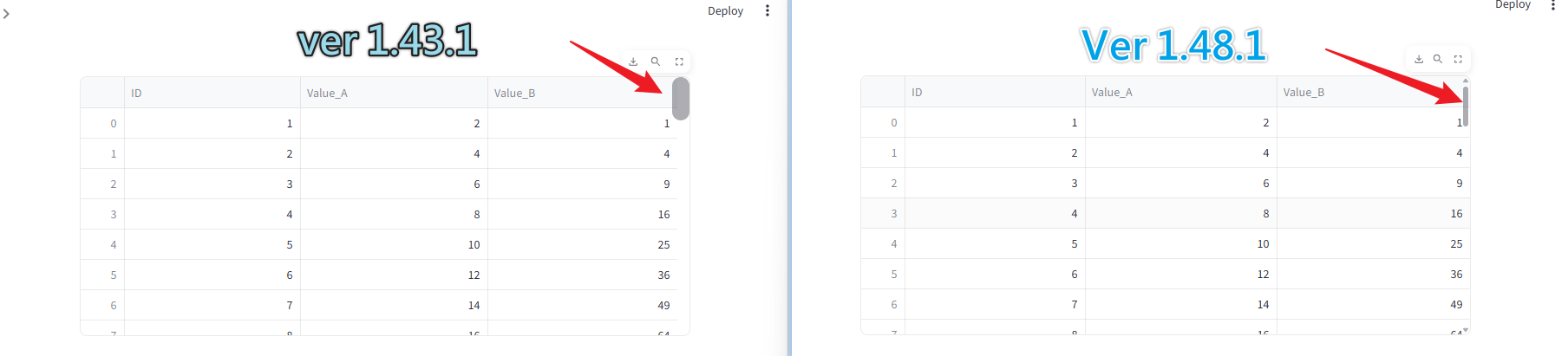
I noticed that the scrollbar styling for st.dataframe behaves differently between Streamlit 1.43.1 and 1.48.1.
Here is a minimal example:
# app.py
import streamlit as st
import pandas as pd

# CSS
st.markdown("""
    <style>
        [data-testid="stDataFrame"] ::-webkit-scrollbar,
        [data-testid="stDataFrame"] * ::-webkit-scrollbar {
            width: 20px;
            height: 20px;
        }
    </style>
""", unsafe_allow_html=True)

# Data
df = pd.DataFrame({
    "ID": range(1, 51),
    "Value_A": [x * 2 for x in range(1, 51)],
    "Value_B": [x ** 2 for x in range(1, 51)],
})

# Table
st.dataframe(df, height=300, use_container_width=True)
Issue:
- In 1.43.1: The CSS rule
width: 20px; height: 20px;correctly affects the scrollbar ofst.dataframe, making it visibly thicker. - In 1.48.1: The same CSS has no effect, and the scrollbar looks like the default browser style. It seems that custom CSS can no longer override it the same way.
Questions:
- Was there a DOM structure or CSS isolation change in recent versions that breaks this customization?
- Is there a recommended way in 1.48.1 to adjust the scrollbar size of
st.dataframe?
Thanks in advance!